SkyportHome
- 4.6
- Rating
- 100.00K
- Installs
- Free
- Price

 Analysis by App-foxy
I installed SkyportHome to see whether it makes everyday heating and cooling control genuinely easier, rather than simply putting a familiar thermostat screen on a phone. My overall impression is that it is most useful when you already have a compatible Daikin, Amana, or Goodman system and want convenient access away from the wall control. It is a focused House & Home app, not a general smart-home command center, and that narrow purpose is both its biggest strength and its main limitation.
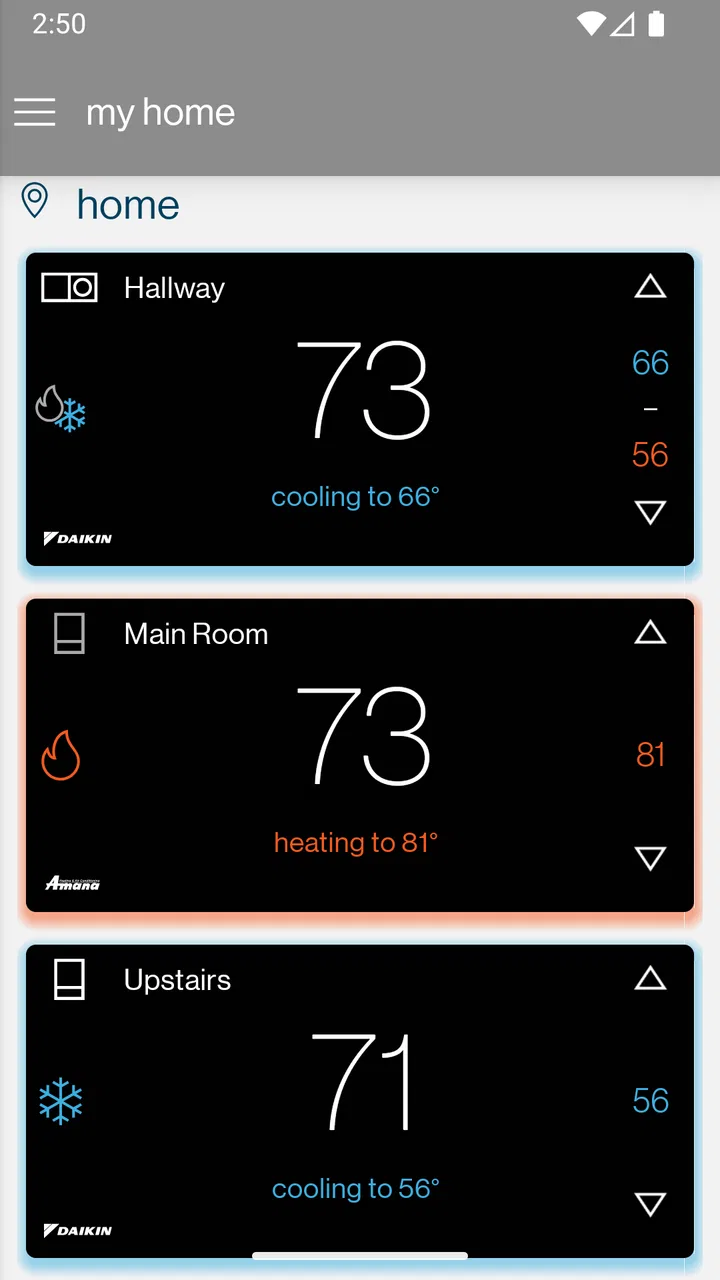
The app is developed by Daikin Comfort Technologies North America, Inc., and its central idea is straightforward: use a mobile device to manage supported heating and cooling equipment while you are elsewhere. That can mean checking the home before leaving work, making a small adjustment from another room, or avoiding the need to walk to the thermostat when the temperature feels wrong. I found that focused approach easier to understand than apps that combine climate controls with lighting, cameras, locks, and unrelated automation.
How SkyportHome fits into everyday climate control
SkyportHome is free to download and use as an app, which makes the initial decision uncomplicated. There is no purchase price to weigh against a promised feature set. The important value question is different: do you already own a compatible system, and does remote access solve a problem you actually have? Free access is useful here because it lets the app serve as a companion to existing equipment rather than asking you to buy another thermostat simply to try the software.
You May Also Like

 Blood Strike: 2.5 Anniversary
Blood Strike’s Loadouts Turn Every Drop Into a Tactical Gamble
A close look at Blood Strike’s custom loadouts: how fast access to signature weapons reshapes its battle royale rhythm, rewards preparation, and narrows the gap between fights.

 Pandora - Music & Podcasts
Pandora’s Music Is Easy to Start, but Harder to Recover
Pandora’s strength is its low-effort path from a seed to a station. Its weak spot is how much confidence it asks you to place in connection, setup, and quiet recovery.

 8 Ball Pool
 Is Built on Rivalries, Rematches, and Routine
A close look at the rivalries, rematches, shared routines, and unanswered safety questions that turn a quick pool match into a persistent mobile community.

 Samsung Music
’s Quiet Strength Is Playing What You Already Own
Its reach comes less from spectacle than from dependable access to a personal library. That simplicity is both the app’s strongest retention engine and its ceiling.

 AccuWeather: Weather Radar
AccuWeather Review: A Quick, Clear Forecast for Everyday Decisions
For everyday plans, the best forecast is the one you can understand quickly. AccuWeather makes rain timing, radar, and local conditions easy to act on, with a few trade-offs.

 Hill Climb Racing
Why Hill Climb Racing Still Turns Crashes Into One More Run
A tiny car, a bumpy hill and one more upgrade: Hill Climb Racing keeps resurfacing because its simple chaos makes every near-miss feel personal.
More From Our News Desk
View All News


I would not describe it as a replacement for heating and cooling hardware. The app cannot turn an ordinary, unsupported system into a connected one. Its usefulness depends on the equipment and setup in the home, so someone browsing for a universal thermostat solution should not treat the free price as a reason to install it blindly. In that situation, checking compatibility and the required setup path before changing anything is the sensible first step.
The store summary presents control for Daikin, Amana, and Goodman heating and cooling systems from anywhere. In practical terms, that makes the app valuable for people who want a remote control layer over equipment they already use. It is less compelling for a renter or homeowner whose system belongs to another brand, and it is not the right answer for someone who expects one application to operate every connected device in the house.
What I found useful during normal use
The strongest use case is the small adjustment that would otherwise be easy to postpone. Imagine leaving home on a mild morning and later realizing the weather has changed. Instead of waiting until you return to change the indoor setting, you can use the phone as the point of control. The same idea works when you are already in bed, working in another room, or arriving home after being away. These are modest conveniences, but they are exactly the kind that make a dedicated home app earn its place.
I also see value for households where one person is away from the property while another is still there. A family member can check the climate system without asking someone else to find the wall controller. That does not eliminate the need for communication, but it can reduce the back-and-forth around a simple temperature change. For a second home or a property visited irregularly, remote access can be more meaningful than it is in a small apartment where the thermostat is always a few steps away.
One less obvious benefit is the ability to separate the timing of a decision from the moment you act on it. If you remember a desired adjustment while commuting or shopping, the phone is already with you. You do not have to rely on remembering again after you walk through the door. I would not install the app solely for that convenience, but for someone who frequently leaves the system in an inconvenient state, it can become a practical habit.
Where it differs from broader alternatives
Compared with a conventional wall thermostat, SkyportHome adds reach rather than necessarily adding a completely new way to heat or cool a room. The wall control remains the more immediate option when you are standing beside it, and it may feel simpler for people who do not want to use a phone for basic adjustments. The app becomes more useful when distance matters, whether that distance is across the house or across town.
Compared with a broad smart-home platform, the app has a clearer boundary. A general platform may be preferable if your priority is bringing climate, lights, security, and other devices into one dashboard. SkyportHome makes more sense when the heating and cooling system is the main concern and you would rather use a manufacturer-focused tool than build a larger connected-home setup. That narrower design can reduce clutter, but it also means the app should not be judged as if it were trying to replace an entire smart-home ecosystem.
There is also a trade-off against simply using the equipment’s existing controls. A phone app introduces another place to learn and maintain. If everyone in the household is comfortable with the physical thermostat and nobody needs remote access, the additional layer may feel unnecessary. In my view, the app earns its keep through convenience at a distance, not because every temperature change is better when made on a screen.
Small workflow tips that make the app more worthwhile
My first practical tip is to decide what problem you want the app to solve before treating it as a daily control panel. Remote checking, arrival preparation, and avoiding trips to the thermostat are distinct benefits. Picking one or two of them gives the app a clear role and makes it easier to notice whether it is actually helping. Without that purpose, it can become another rarely opened utility on the phone.
A second useful habit is to use the app as a confirmation step when your routine changes. If you leave earlier than usual, return later than expected, or spend an unusual day at home, a quick check can prevent the system from being left in the setting intended for a completely different schedule. I see this as a workflow advantage rather than a flashy feature: the phone is useful because it travels with you and can prompt a decision at the right moment.
Third, I would keep the physical control familiar even if the app becomes your preferred option. A household should not depend on one person knowing the mobile workflow. Guests, relatives, or anyone dealing with an unexpected comfort issue may still need the wall control. The best arrangement is to treat SkyportHome as an additional route to the system, not as a reason to forget how the equipment works locally.
Finally, I would avoid making the app the sole basis for judging whether the heating or cooling system is healthy. A remote control screen can be convenient, but it is not a substitute for paying attention to unusual sounds, comfort problems, or equipment behavior. If the home is not reaching the expected temperature, changing a setting repeatedly through the phone may only disguise a hardware or maintenance issue. That distinction is important because convenience can otherwise encourage people to troubleshoot the wrong part of the setup.
Setup expectations and everyday friction
The main friction is compatibility. The presence of the Daikin, Amana, and Goodman names makes the target audience clear, but brand ownership alone does not guarantee that every system will work in the same way. I would approach installation with the model and existing control arrangement in mind. Someone buying a new system should confirm that remote app access is part of the intended setup rather than assuming the app will add it afterward.
Another point is household adoption. A remote-control app is most effective when the people who need it can understand the controls quickly. If one person prefers the wall thermostat and another prefers the phone, that is not a problem by itself, but it helps to agree on who makes changes and when. Otherwise, the convenience of multiple control points can turn into uncertainty about why the setting changed.
I also think the app is better suited to deliberate adjustments than constant fiddling. Heating and cooling are not like music playback, where switching options every few minutes is harmless and entertaining. Repeatedly changing the target because the room feels temporarily different can make the experience less predictable. I found more value in using the app to make a considered change and then letting the system do its job.
The app’s age rating is Everyone, which fits its practical household purpose. Its current version is 3.6.4, and it has been available since April 12, 2019. Those details suggest an established product rather than a brand-new experiment, but they should not be mistaken for a guarantee that every phone, system configuration, or household workflow will feel identical. The sensible approach is still to keep the app updated and judge it alongside the equipment it is meant to control.
Who is likely to get the most value
I would recommend SkyportHome first to owners of compatible Daikin, Amana, or Goodman systems who regularly want control while away from the thermostat. It is particularly appealing if your schedule changes often, if you prepare the home before arriving, or if the thermostat is inconveniently located. People managing a larger home may also appreciate having a control option that does not require walking to a central point every time comfort needs attention.
It can also suit someone responsible for a property that is not occupied continuously. The ability to interact with the heating and cooling system from a distance is more relevant when you cannot simply enter the room and inspect the control. I would still treat it as a convenience tool, not as a replacement for property checks or equipment care. Remote access can help with routine adjustments, but it does not make an unattended home self-managing.
The app is less attractive for people with non-compatible equipment, people who want one dashboard for many smart-home brands, and people who are perfectly satisfied with a physical thermostat. It is also a poor fit if your main goal is advanced whole-home automation and you are already committed to another platform. In those cases, a broader solution may better match the way you want to organize your devices, even if SkyportHome is free.
Its audience is therefore quite specific, and I consider that a positive when setting expectations. The app does not need to appeal to everyone to be useful. It needs to give a compatible system owner a convenient, understandable way to interact with heating and cooling equipment. If that describes your home, the focused design is easier to appreciate than the lack of unrelated features.
What the reception suggests
SkyportHome holds a 4.5 average from around 4.8 thousand ratings, with roughly 544 written reviews. That is a healthy reception for a practical utility, and it supports the idea that many users find the basic concept worthwhile. I would read those figures as evidence of broad satisfaction, not as proof that setup or compatibility will be effortless for every household.
The app has passed 100 thousand installs, which gives it a meaningful user base without making it feel like a general-purpose platform used by everyone. That scale is consistent with a manufacturer-oriented tool serving people who own particular equipment. It also reinforces my advice to focus on whether your system belongs in that audience instead of using popularity alone as the deciding factor.
Because the app is free, the value calculation is relatively forgiving. You are not comparing a subscription commitment or a purchase price with the convenience it provides. The real cost is time spent setting it up, learning it, and deciding whether remote control belongs in your routine. If it works with your system and you need that access, the barrier is low. If you do not need remote access, free does not automatically mean useful.
My verdict for a real household decision
After using it, I see SkyportHome as a sensible companion for compatible Daikin, Amana, and Goodman heating and cooling systems. Its best quality is not complexity; it is the ability to put a focused control option where I already keep my phone. That matters in ordinary situations: leaving work, changing plans, staying in another room, or managing a property from a distance.
I would choose it over a generic alternative when the supported equipment is already installed and climate control is the only connected-home task I care about. I would choose a broader smart-home platform instead when I need several device categories coordinated in one place. I would stick with the wall control when remote access has no role in my routine. Those are not failures of the app; they are clear boundaries around where it delivers value.
My recommendation is to try it if you own compatible equipment and want remote convenience, but skip it if you need universal device support or advanced whole-home control. Since the app is free, the decision is mainly about fit rather than purchase risk. For the right household, it is a practical extra control point. For everyone else, the usual thermostat or a broader platform may be the more sensible choice.
FAQs for SkyportHome
01What is SkyportHome and what does it offer?
SkyportHome is a comprehensive home automation app designed to integrate and manage various smart home devices from a single platform. It offers features such as remote control of lighting, temperature, security cameras, and more. The app aims to provide convenience and enhanced security, making it an essential tool for anyone looking to streamline their smart home experience.
02Is SkyportHome compatible with all smart home devices?
SkyportHome is compatible with a wide range of smart home devices, but not all. It supports popular brands and protocols like Zigbee, Z-Wave, and Wi-Fi-enabled devices. It's always a good idea to check the compatibility list on the app’s website or within the app itself to ensure your devices are supported before downloading.
03How secure is SkyportHome in terms of data privacy?
SkyportHome prioritizes user privacy and employs robust encryption protocols to protect your data. It also offers optional two-factor authentication for an added layer of security. The app complies with major data protection regulations, ensuring your personal information and home network remain secure from unauthorized access.
04Does SkyportHome require a subscription, and are there any hidden costs?
SkyportHome offers a free version with basic features, but for advanced functionalities, a subscription is necessary. There are no hidden costs, and users are clearly informed about the subscription tiers and the features they unlock. Be sure to review these details to choose the plan that best fits your needs.
05How user-friendly is the SkyportHome app for beginners?
SkyportHome is designed with user-friendliness in mind, featuring an intuitive interface that guides users through setup and daily use. It includes helpful tutorials and a responsive customer support team to assist new users. Whether you're tech-savvy or a beginner, you'll find the app easy to navigate and customize to your preferences.
Pros
- User-friendly interface for easy navigation.
- Customizable home screen widgets.
- Seamless integration with smart devices.
- Real-time notifications and alerts.
- Energy-saving tips and tools included.
Cons
- Limited compatibility with older devices.
- Premium features require a subscription.
- Occasional sync issues with devices.
- No offline mode available.
- Infrequent app updates and bug fixes.

SkyportHome
Gallery